Tag Archives: WLS

Determine if a Smart Card Was Used for Logon

This method can only determine if a logon used Public Key Cryptography for Initial Authentication (PKINIT); successive locks / unlocks will continue to report the information from the initial logon.

According to this article: http://social.technet.microsoft.com/wiki/contents/articles/11844.find-out-if-a-smart-card-was-used-for-logon.aspx, a special security group is injected into the user’s access token when a smart card is used. Comparing the current user token group members between a password and smart card authenticated session revealed the group “NT Authority\This Organization Certificate” (S-1-5-65-1). (PowerShell for this below)

A search for S-1-5-65-1 returned this article: https://msdn.microsoft.com/en-us/library/cc980032.aspx, with the following information:

THIS_ORGANIZATION_CERTIFICATE

S-1-5-65-1

A SID that indicates that the client’s Kerberos service ticket’s PAC contained a NTLM_SUPPLEMENTAL_CREDENTIAL structure (as specified in [MS-PAC] section 2.6.4). If the OTHER_ORGANIZATION SID is present, then this SID MUST NOT be present. <25>

Following the link to section 2.6.4 leads to the description: “The PAC buffer type is included only when PKINIT [MS-PKCA] is used to authenticate the user”

So, by what I can find and test, the presence of “NT Authority\This Organization Certificate” (S-1-5-65-1) in the user’s access token groups positively indicates whether the initial authentication used PKINIT, e.g., smart card.

This can be tested with the following PowerShell code:

$objGroup = New-Object System.Security.Principal.SecurityIdentifier("S-1-5-65-1")
([System.Security.Principal.WindowsIdentity]::GetCurrent()).Groups.Contains($objGroup)

WLS now uses a similar method with SessionMonitor. Any time a session changes, the AuthenticationType, CredentialProvider, and PKINIT will now be reported.

2015-11-18T07:16:54-06:00 [host] WLS_SessionMonitor: LogType=”WLS”, ApplicationName=””, AuthenticationType=”Kerberos”, BuildNumber=”0″, ClientAddress=””, ClientDirectory=””, ClientName=””, CredentialProvider=”Smartcard Credential Provider”, EncryptionLevel=”High”, HardwareId=”0″, InitialProgram=””, Message=”SessionUnlock”, PKINIT=”True”, ProductId=”0″, Protocol=”Console”, Resolution=”640×480″, SessionId=”10″, SessionName=”Console”, SourceAddress=””, SourceName=””, User=”[domain]\[user]”, WLSKey=”677″, WorkDirectory=””


For more information on WLS, click “WLS Information” at the top, or here: WLS Information

If you’d like additional information about WLS, send me a note via the contact form. WLS is currently available to US entities, but does require a signed license agreement.

WLS 3.4 Released!

New

  • CommandMonitor support for wmic.exe
    • Ability to add other binaries
  • FileMetadata
    • File buffer size
    • File size and time limits for calculating hashes and entropy
  • FileMonitor special folder support which follows the interactive user
  • Heartbeat
    • Configurable interval. Reports DBSize, ConnectionErrors, LogsWLSError, WLSVersion
  • Log filtering
    • Per log route destination
  • LogFormats
    • All formats are now defined by the configuration
    • Custom formats can be added, existing ones changed, etc.
  • LogRouting
    • Simultaneous multi-destination sending of logs with per-server log formatting
  • Performance counters
    • Filtering by condition
  • ShowEntryTypeDescription
  • ShowLogonTypeDescription
    • Defaults to True for legacy compatibility
  • TrackHashes
    • Tracking of hashes to set the NewHash=True flag can be enabled / disabled
      • Tracking hashes takes space in the database and time during database writes

Changes

  • CertMonitor – FullReportInterval for interval based reporting
  • Entropy and hash calculations integrated to reduce file iterations and support timeouts
  • FileData logs the CreatorProcessName and CreatorProcessId
  • FileMetadata searches for non-rooted files iterating through the PATH variables
  • MaxLogLength now simply truncates the log if it is oversize

Fixes

  • Command Monitor – Fixed bug with greater than 16-bit PIDs
  • ConfigurationHash calculation
  • IPv6 parsing when specified as a log destination

For more information on WLS, click “WLS Information” at the top, or here: WLS Information

If you’d like additional information about WLS, send me a note via the contact form. WLS is currently available to US entities, but does require a signed license agreement.
Windows 7/2008 + RDP8 = Incorrect source network address

A few months ago I noticed some odd IP addresses in the WLS SessionMonitor logs for a few of our hosts. After confirming that this was not the result of a compromise I began digging further into the issue.

Our networking team had started investigating usage of RDP8 to improve the user experience for remote users, and had installed RDP8 and enabled the RDP8 protocol via policy on their Windows 7 systems. When an RDP connection was made, the Source Network Address was incorrect in Security Event ID 4624 (successful logon events), TerminalServices-RemoteConnectionManager Event ID 1149, and TerminalServices-LocalSessionManager Event ID 25. Usually this was reported as “0.0.0.0”, but sometimes contained random numbers. WLS uses WinStationQueryInformationW to retrieve the source network address for the session and it returned the same information that is reflected in the event logs.

Further testing showed that this only impacted Windows 7/2008 systems with RDP8 installed and enabled. Disabling the RDP8 protocol in the policy forces the connection to fall back to RDP7 which reports the IP address as expected. Changing the RDP transport protocols did not appear to have any effect.

The RDP8 protocol policy is located at:

Computer Configuration\Administrative Templates\Windows Components\Remote Desktop Services\Remote Desktop Session Host\Remote Session Environment\Enable Remote Desktop Protocol 8.0

The RDP transport protocols policy is located at:

 Computer Configuration\Administrative Templates\Windows Components\Remote Desktop Services\Remote Desktop Session Host\Connections\Select RDP transport protocols

Due to the way RDP was previously implemented, there will not be a fix provided that allows the Source Network Address to be properly reported in event logs, or a way to retrieve it via an API call. Here’s the associated KB for the issue detailed above: https://support.microsoft.com/en-us/kb/3097467

WLS 3.3 Released

New

  • Burn folder support for FileMonitor
  • FileData
    • Log file metadata for files found in command line parameters and event logs
  • Fixed (non-removable) disk monitoring
  • Load balancing
  • Network location awareness by joined domain
  • Optional host name set by DNS resolution
  • Optional alternate static host name
  • Monitoring UDF optical media changes
  • Support for non-FIPS hashing algorithms when FIPS mode is enabled
  • Suspended process checking (potential process hollowing)

Changes

  • Command line string handling
  • Database quota handling and maintenance
  • Error reporting
  • Event log extra data parsing
  • Event log XML parser
  • Installer
  • Network adapter reporting
  • New event log provider string resources (dynamic loading)
  • NewHash checking accuracy
  • Optimized syslog string generation
  • SessionMonitor reporting
    • All available session data logged for each session change event
    • Source IP address, optional source name (by resolution)
  • SQLite driver update
  • WMI reporting
    • Array handling
    • Nested WMI object support
    • Result count and index

Fixes

  • Database over quota issues
  • Drive monitor errors for unsupported file systems (HFS+, etc.)
  • Event log subsystem error detection
  • Potential WTS memory leak

For more information on WLS, click “WLS Information” at the top, or here: WLS Information

If you’d like additional information about WLS, send me a note via the contact form. WLS is currently available to US entities, but does require a signed license agreement.
WLS 3.2 Released

Performance

  • Replaced WMI calls with native API calls where applicable
  • Faster database maintenance procedures

Features

  • CPU utilization tracking and reporting
  • New process metadata
    • ConsoleProcessId
    • SessionId
    • WindowStation

Fixes

  • Disconnected client resource utilization
  • Additional handling of SEHExceptions
  • Errors for EventRecordIDs > int32.Max

For more information on WLS, click “WLS Information” at the top, or here: WLS Information

If you’d like additional information about WLS, send me a note via the contact form. WLS is currently available to US entities, but does require a signed license agreement.

WLS 3.1 Released

Performance

  • Over 10x increase in internal throughput
  • Reduced internal latency
  • Improved read/write concurrency
  • Reduced I/O writes

Features

  • Advanced log filtering
  • Detailed statistic logs of log filter matches
  • Certificate monitoring enhanced – all stores now available
  • Configuration hashing – ensure hosts are running the correct configuration
  • Enhanced CommandMonitor – Faster memory searches, includes process name, support for cmd, powershell, and more!
  • Detailed network interface logs on start-up and network change
  • Display names for coded values
  • ETL monitoring for Event Logs and files
  • Per server bandwidth and maximum log length settings
  • Full SSL connection details logged on first connection
  • Input rate limiting – prevent unexpected log floods
  • PrivateMBLimit – prevent WLS from consuming resources on a troubled system
  • SSDeep hashing
  • SessionMonitor – now includes all remote session details for RemoteConnect
  • User SID resolution to user name when present in log
  • Versioning changed – Major.Minor.[Year][DayOfYear].[MinuteOfDay]
  • Registry and file locations now restricted to Local System and Administrators

For more information on WLS, click “WLS Information” at the top, or here: WLS Information

If you’d like additional information about WLS, send me a note via the contact form. WLS is currently available to US entities, but does require a signed license agreement.

Finding vulnerable OpenSSL DLLs (Heartbleed) with WLS and Splunk

If you are running WLS with ModuleMonitor enabled, you already have logs of all loaded DLLs.

Simply run the following search:

WLS_ModuleMonitor “openssl” FileVersion=”1.0.1*” NOT FileVersion=”1.0.1g”

Results will look similar to:

2014-04-24T11:28:38-05:00 [host] WLS_ModuleMonitor: LogType=”WindowsEventLog”, BaseFileName=”ssleay32.dll”, ChangeType=”Added”, CompanyName=”The OpenSSL Project, http://www.openssl.org/&#8221;, FileDescription=”OpenSSL Shared Library”, FileName=”C:\Program Files\MakerBot\MakerWare\ssleay32.dll”, FileVersion=”1.0.1e”, InternalName=”ssleay32″, Language=”English (United States)”, Length=”343040″, MD5=”A49B52FB216AD1524C902A41A433A1E1″, Process=”makerware”, ProductVersion=”1.0.1e”, SHA1=”F21CBCC5F291C1D841581FDBBBF854B315D71248″, WLSKey=”35505″, Zone=”0″


For more information on WLS, click “WLS Information” at the top, or here: WLS Information

If you’d like additional information about WLS, send me a note via the contact form. WLS is currently available to US entities, but does require a signed license agreement.

Decoding Event Log Provider Message IDs

When reviewing event logs in Event Viewer, the General tab shows event details in a human readable format, including displaying localized strings.

general_tab

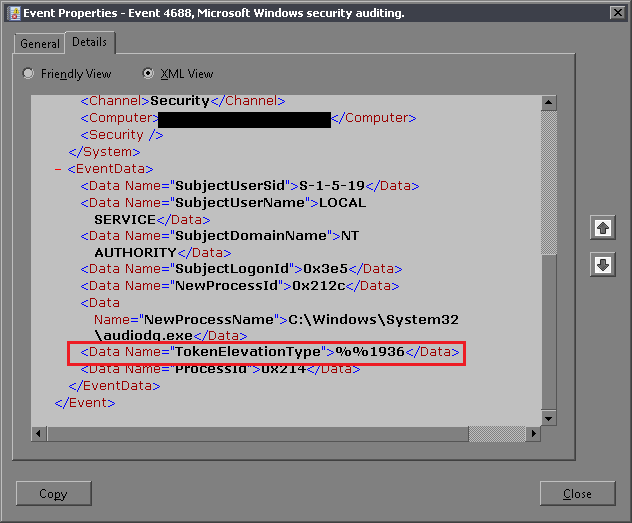
However, when viewing the log on the Details tab in Friendly or XML view some of this “decoding” is not performed.

detail_friendly detail_xml

The Problem

WLS uses the XML version of logs, so these same codes were passed along instead of the localized string. For many logs this was OK since it was fairly easy to find the code in question and the corresponding value. While exploring this further (at customer request), I found that for some logs these values can change by host and version of the software generating the logs, as it is dependent on the provided message files. This made my previous plan to use static lookup tables unfeasible.

The Solution

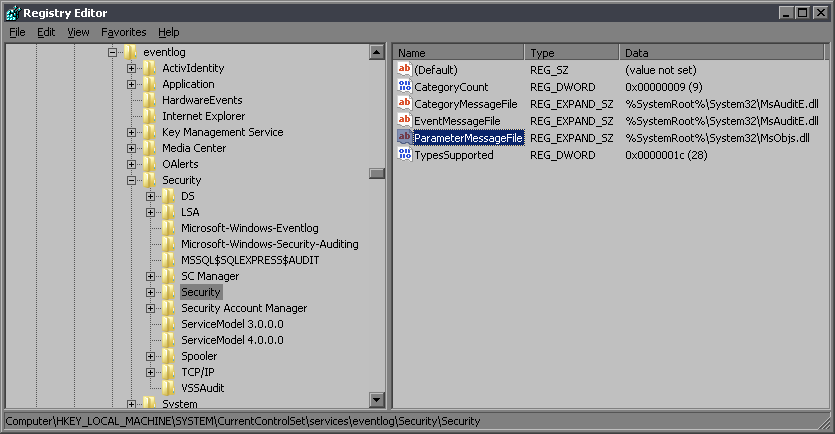
The files that contain localized event log messages are identified for each event source in the registry at HKLM\SYSTEM\CurrentControlSet\services\eventlog\$logname$\$channel$. For example, Security log message files are identified at:

HKLM\SYSTEM\CurrentControlSet\services\eventlog\Security\Security

registry_eventlog_parameter_file

If you open the file identified as the ParameterMessageFile in a resource viewer you’ll see a message table for each language code with a list of messaged IDs and values.

resource

Now that we have the message IDs and the file to decode them, decoding them is easy with a call to FormatMessage, which expects a handle to the message file and a message ID. The message file is loaded as a data file with LoadLibraryEx and the returned handle and a message ID are passed to FormatMessage. If successful, our string buffer now contains the message.

WLS performs the above actions if DecodeProviderString is enabled. A new field will be created with the decoded value, or if ReplaceProviderString is enabled, the original field value will be replaced with the decoded value.

Example

Field added:

[host] Security: LogType="WLS", BaseFileName="audiodg.exe", Channel="Security", CompanyName="Microsoft Corporation", Computer="[host].[domain]", CreatorProcessName="svchost", EventID="4688", EventRecordID="11668699", ExecutionProcessID="4", ExecutionThreadID="56", FileDescription="Windows Audio Device Graph Isolation", FileVersion="6.1.7600.16385 (win7_rtm.090713-1255)", InternalName="audioadg.exe", Keywords="0x8020000000000000", Language="English (United States)", Length="126464", Level="0", MD5="D5CCA1453B98A5801E6D5FF0FF89DC6C", NewProcessId="0x3188", NewProcessName="C:\Windows\System32\audiodg.exe", Opcode="0", ProcessId="0x214", ProductVersion="6.1.7600.16385", ProviderGuid="{54849625-5478-4994-A5BA-3E3B0328C30D}", ProviderName="Microsoft-Windows-Security-Auditing", SHA1="F033FD30AACD0183BFC30861891A92B56AC2468B", Signed="Catalog", SubjectDomainName="NT AUTHORITY", SubjectLogonId="0x3e5", SubjectUserName="LOCAL SERVICE", SubjectUserSid="S-1-5-19", Task="13312", TokenElevationType="%%1936", TokenElevationTypeValue="TokenElevationTypeDefault (1)", ValidSignatureDate="False", Version="0", Zone="0"

Value replaced:

[host] Security: LogType="WLS", BaseFileName="audiodg.exe", Channel="Security", CompanyName="Microsoft Corporation", Computer="[host].[domain]", CreatorProcessName="svchost", EventID="4688", EventRecordID="11668699", ExecutionProcessID="4", ExecutionThreadID="56", FileDescription="Windows Audio Device Graph Isolation", FileVersion="6.1.7600.16385 (win7_rtm.090713-1255)", InternalName="audioadg.exe", Keywords="0x8020000000000000", Language="English (United States)", Length="126464", Level="0", MD5="D5CCA1453B98A5801E6D5FF0FF89DC6C", NewProcessId="0x3188", NewProcessName="C:\Windows\System32\audiodg.exe", Opcode="0", ProcessId="0x214", ProductVersion="6.1.7600.16385", ProviderGuid="{54849625-5478-4994-A5BA-3E3B0328C30D}", ProviderName="Microsoft-Windows-Security-Auditing", SHA1="F033FD30AACD0183BFC30861891A92B56AC2468B", Signed="Catalog", SubjectDomainName="NT AUTHORITY", SubjectLogonId="0x3e5", SubjectUserName="LOCAL SERVICE", SubjectUserSid="S-1-5-19", Task="13312", TokenElevationType="TokenElevationTypeDefault (1)", ValidSignatureDate="False", Version="0", Zone="0"


For more information on WLS, click “WLS Information” at the top, or here: WLS Information

If you’d like additional information about WLS, send me a note via the contact form. WLS is currently available to US entities, but does require a signed license agreement.